Archive for the ‘Google Features’ Category

Google Books

Monday, June 14th, 2010

In a way, Google Books is the original idea that launched Google.  According to Google’s own official history of the project, “In 1996, Google co-founders Sergey Brin and Larry Page were graduate computer science students working on a research project . . . Their goal was to make digital libraries work, and their big idea was . . . a ‘web crawler’ to index the books’ content and analyze the connections between them”

By 2004 the technical challenges of scanning millions of books without damaging them had been overcome and Google entered into a formal agreement to scan the public domain content of Oxford University’s Bodleian library.  Partnerships followed with Harvard, the University of Michigan, the New York Public Library, Oxford and Stanford.  Today the list of worldwide Library Partners continues to grow.

The Google Books Project uses special book scanners and optical character recognition to create a searchable digital library.  The project has drawn criticisms and controversies relating to copyright infringement, but a settlement is in the works.  Most recently Google has announced plans to open an online book store called Google Editions.

So search Google Books today and see what it has to offer!

More about the Google Books Project (from PBS NEWSHOUR, Dec. 2009):

SketchUp

Monday, January 11th, 2010

sketchup1SketchUp was introduced by a company called @Last Software in 2000. The creators, Brad Schell and Joe Esch wanted to make a 3D design program “that would allow design professionals to draw the way they want by emulating the feel and freedom of working with pen and paper in a simple and elegant interface…” Wikipedia entry about SketchUp

In 2006 Google aquired @Last Software and currently offers Sketchup as a free download. They also offer a professional version of the software for purchase.

SketchUp has lots of features and is very easy to use. Below is a short video to help you get started with it and here’s a link to download it to your own computer: http://sketchup.google.com/download/index2.html

Alkemis.com

Wednesday, September 23rd, 2009

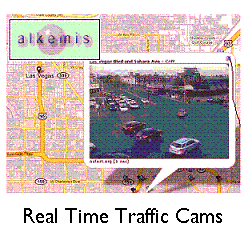
im04Local.Alkemis.com is a website that offers lots of local information, including access to traffic cameras in cities all around North America and even a few cities around the world.  Alkemis.com has several projects underway with this mapping system that combines Google Maps, live traffic cams as well as Yahoo Traffic, Weather, Local News, Fandango Movies, even local subway maps where possible.  An amazing experiment in combining multiple forms of data into an integrated and functional website.  Keep checking back as they develop more and more information for cities like:  New York, Washington, Las Vegas, Toronto, Los Angeles, Dallas, Boston, London, and Dublin.  Here’s a link to all the cities they cover.

This site is one to watch for future developments!

Google Earth

Thursday, August 20th, 2009

im07Google Earth is a free download from Google that offers a unique, interactive, dynamic globe that’s created using satellite photos and electronic data from all kinds of resources.  Lets say you want to check out a friend’s new house in Washington D.C. By typing in the address you can zoom right in on a satellite photo of their house that you can then move around.  You can search their neighborhood for restaurants, schools, libraries, gas stations, whatever you want.  But that’s not all, next you could add layers to the satellite photo that would tell you things like voting district borders, real time traffic speeds, crime statistics, all kinds of stuff.  You can even find YouTube videos, streaming webcams and photos of neighborhoods.  Try checking out the 3-D renderings of whole cities and, if you go to places like the Grand Canyon you can view the terrain in 3-D.

It’s an amazing integration of information in an easy to use interactive format that has to be experienced.   If you need some help getting started try searching YouTube for “Google Earth Tutorials.”

For a little fun don’t forget to try the flight simulator that’s in the program.  Once you’re in Google Earth press:  CTRL+ALT+A to access it.

Google Moon

Sunday, August 9th, 2009

im01

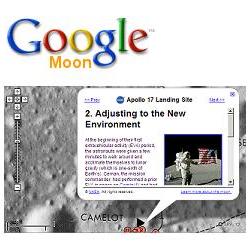
Google Moon gives you an opportunity to explore our moon.  See the locations of the lunar landings and hundreds of pictures from the Apollo Program.  Zoom in using the slider on the left of the screen.  Hold the left mouse button down to move around the surface of the Moon.  As you zoom in on the sites of the Apollo landings you’ll start to see more and more detail.  Across the bottom of the screen you’ll see actual pictures from the Apollo missions.  In the upper right there are buttons to change to experiment with that offer detailed charts, elevation maps, locations of the Apollo missions and satellite images of the moon.
Google Moon was created through the cooperation of Google and the NASA Ames Research Center.  You can learn more about how Google Moon works at:  http://www.google.com/moon/about.html